Training
··5 min readSquat Form Checklist: 7 Mistakes That Are Quietly Wrecking Your Knees

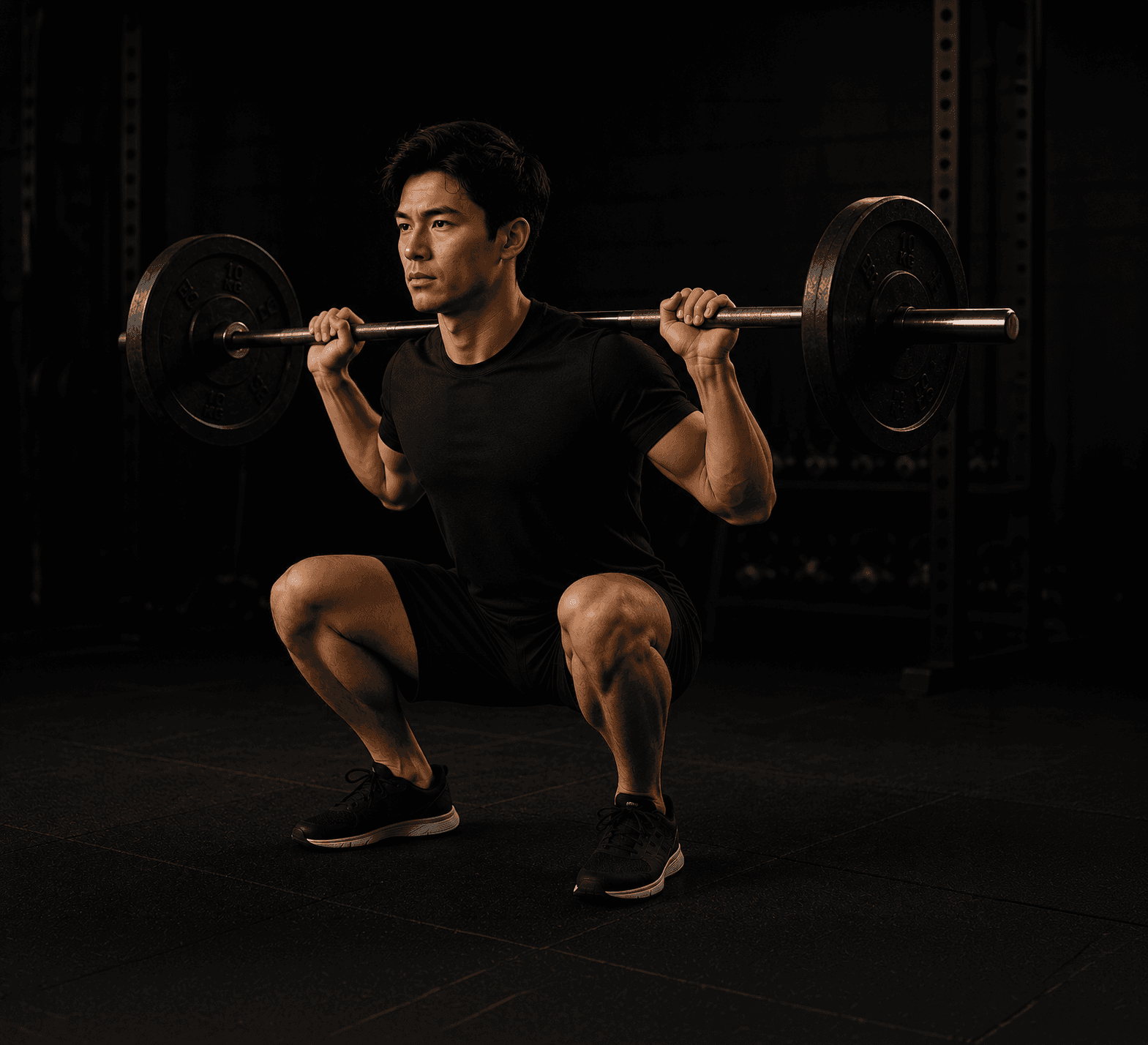
Knee pain during or after squatting sends a lot of people to the internet looking for an answer, and a lot of that advice lands in one of two unhelpful places: "squats are bad for your knees" (they generally aren't, when done well) or a wall of anatomy jargon that doesn't actually tell you what to change.
Most squat related knee pain traces back to one of a small set of form issues. Here's the checklist, in the order worth checking first.
Why the knees take the blame
The knee is a hinge joint sitting between two long levers, the femur and the tibia. When the hip, ankle, or bar path isn't doing its job properly during a squat, the knee often ends up absorbing forces it wasn't designed to manage alone. The knee usually isn't the source of the problem. It's where the problem shows up.
That's good news, because it means fixing knee pain from squatting is rarely about "protecting your knees" directly. It's about fixing what's happening above and below them.
The 7 mistakes to check
1. Knees caving inward on the way up. Called knee valgus, this is one of the most common issues and one of the easiest to feel once you know to look for it. It usually comes from weak hip abductors and glutes not doing enough to keep the knee tracking over the foot. Fix: cue "push your knees out" through the entire rep, and add banded lateral walks or clamshells to your warm up.
2. Rising heels or excessive forward lean. If your heels lift or your torso pitches sharply forward at the bottom of the squat, ankle mobility is often the limiting factor, not knee strength. Fix: work on ankle dorsiflexion with wall stretches, or use a small heel elevation (weight plates or squat shoes) while mobility improves.
3. Not controlling the descent. Dropping quickly into the bottom of a squat and bouncing out of it puts sudden, high stress through the knee joint instead of distributing load through a controlled range of motion. Fix: slow the lowering phase to a two or three count, every rep, especially when knee discomfort is present.
4. Squatting to a depth your mobility doesn't support yet. Chasing full depth before you have the hip and ankle mobility to control it often forces the low back or knees to compensate. Fix: train to whatever depth you can control with good form, and build depth gradually as mobility improves, not the other way around.
5. Bar path drifting forward. Whether it's a barbell, dumbbells, or bodyweight, the weight (or your torso's center of mass) needs to stay roughly over the middle of your foot throughout the movement. When it drifts forward, the knees end up bearing a disproportionate share of the load. Fix: think about sitting back into the movement, and film yourself from the side to check.
6. Weak or underused glutes. If the glutes aren't contributing much, the quads and knees pick up the slack. Fix: add glute focused accessory work, like hip thrusts or Romanian deadlifts, and cue driving through the whole foot on the way up, not just the front of it.
7. Skipping a proper warm up. Going straight into working weight with cold, stiff joints is one of the simplest and most overlooked contributors to knee discomfort. Fix: a short warm up including bodyweight squats, leg swings, and a couple of light ramp up sets goes a long way.
Why "just watch a form video" often isn't enough
Form checklists like this one are useful, but there's a gap between reading "keep your knees tracking over your toes" and actually knowing whether your knees are doing that on your own reps. Most people genuinely can't tell from the inside. What feels like a straight knee path often looks noticeably different on video.
This is the gap video based technique feedback is built to close. Instead of guessing which of these seven issues applies to you, recording a set and getting feedback on what's actually happening, similar to what a coach watching in person would flag, turns a generic checklist into a specific fix. MVPeak's technique feedback feature works this way: record a set on your phone, and get feedback on what to adjust, whether that's knee tracking, depth, or bar path, rather than working through a list of seven possibilities on your own.
When knee pain needs more than a form fix
Most squat related knee discomfort responds well to the fixes above. That said, sharp pain, swelling, or pain that persists well after training sessions are signals worth getting checked by a physio or doctor rather than working through with cues alone. Form corrections address mechanical issues. They aren't a substitute for medical evaluation when something feels more serious than typical training discomfort.
FAQ
Are squats actually bad for your knees? Generally no, for most healthy people. Squats performed with reasonable form and appropriate load are commonly used in physical therapy to strengthen the muscles supporting the knee joint, not just tolerated despite it.
Why do my knees cave in when I squat? This usually points to weak hip abductors and glutes that aren't controlling knee position well under load. Targeted accessory work and conscious cueing during the lift both help.
How deep should you squat if you have knee pain? Only as deep as you can control with good form. Building depth gradually as mobility and control improve is safer and more effective than forcing full depth immediately.
Should you stop squatting completely if your knees hurt? Not necessarily. Mild discomfort tied to one of the mechanical issues above often improves with form corrections. Sharp, persistent, or worsening pain is a signal to get evaluated before continuing to load the movement.
Want to know exactly what's happening in your own squat, not just a general checklist? Record a set and get feedback on your form from your MVPeak coach. Try it free for 7 days. Find My Coach →
Related read: How Many Meals a Day Should You Actually Eat to Lose Fat?, if training and nutrition are both part of your current goal.
Keep reading
View all posts
Training
·5 min readTraveling for Work? Here's How to Keep Training Without a Gym or a Plan Falling Apart!
Work travel doesn't have to wreck your training. Here's how to keep progressing from a hotel room, with no gym and no equipment!
Training
·5 min readTraining Around a Knee Injury: What's Actually Safe to Do (And What Isn't)
A knee injury doesn't mean training has to stop. Here's what's generally safe to keep doing, what to avoid, and why it varies.

Training
·5 min readHybrid Training Explained: How to Train for Strength and Endurance Without Sabotaging Either
You can build strength and endurance at the same time, if you manage the tradeoffs. Here's how hybrid training actually works.
mvpeak
Put the reading into practice
Every coach on this blog trains members in the app, with plans, sessions and meals built around your week.
No credit card required · Cancel any time